Manage Remitters
❓ What Is a Remitter?
In the HelloMe Money ecosystem, a remitter Simply means the sender — the individual or business who initiates a cross-border transfer.
They are the core users of the product, moving money from a source country and currency (e.g., GBP 🇬🇧) to a destination country and currency (e.g., NGN 🇳🇬).
🧑🤝🧑 Types of Remitters
- 🧍 Individual – Personal users sending money to friends or family.
- 🏢 Business – Companies making corporate or payroll transfers.
The Remitters module serves as the comprehensive KYC, risk management, and account profiling center of the platform, powering compliance, user risk scoring, onboarding, and behavior tracking.
🔰 What the Manage Remitters Sub-Module Does
The Manage Remitters sub-module is a searchable dashboard and profile manager for all registered remitters.
🔍 Filtering & Search Criteria
- Remitter ID, Name, Phone, Email
- Remitter Type: Individual / Business
- Country of Residence
- Receiving Countries
- Document Number, Address, Postcode, City
- Registration Source: Android, iOS, Web, Agent
- Status: Active, Inactive, Blocked, etc.
- Email/Phone Verification Status
- Agent / Branch
- Date of Birth or Registration Date Range
📊 Search Results Table
Displays:
- ID: Unique Remitter ID
- Register Date & IP: Timestamp and device/IP used
- Name: Full Name
- Address: Residence Country
- Contact(s): Phone & Email
- Agent / Branch: Who onboarded them
- Type: Individual / Business
- Amount: Total Transacted
- Risk: Risk Level (Low/Med/High)
- Action: Access to Full Remitter Profile
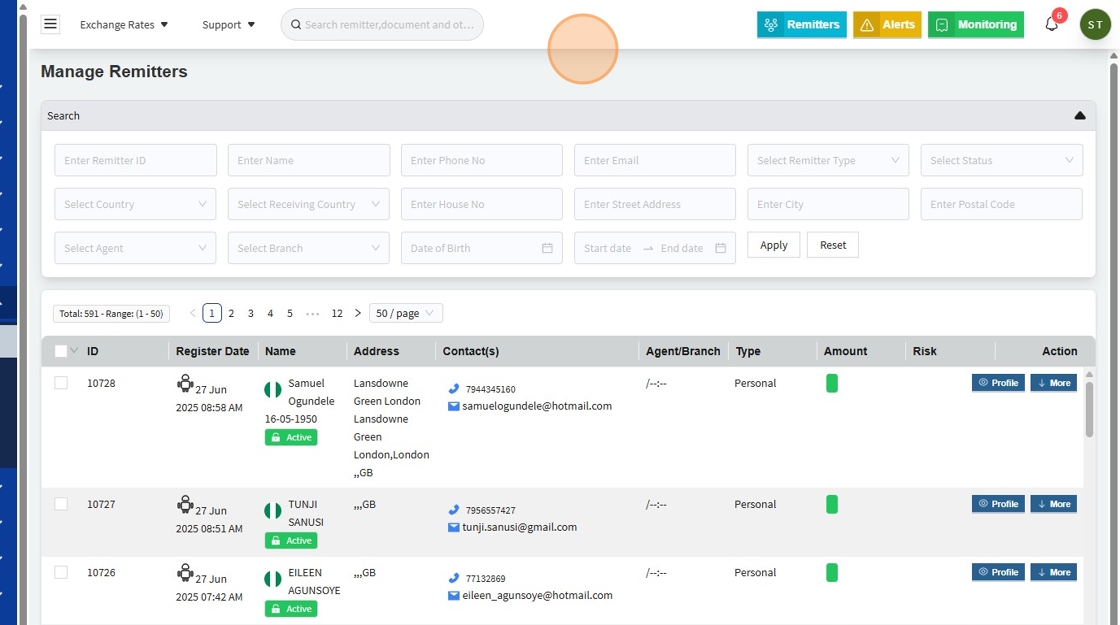
When the admin user clicks or hovers over the “More” button on the Remitters homepage (as shown in the screen above), they will see quick action options to:
- ✏️ Edit User details
- 🔐 Change User Passcode
- 🔑 Change User Password
- 🗑️ Delete User
These quick actions allow admins to efficiently manage user accounts without navigating away from the remitters list view.
👤 Profile View
By clicking “Profile” on the Remitters homepage (as shown in the screen above), you will access the full remitter profile, organized into clear tabs and sections for structured review and management.

| Section | Details |
|---|---|
| Personal Info | Names, DOB, Gender, Address |
| Contact Info | Phones, Email, Web, Devices |
| Compliance Info | Sanction/PEP Status, Risk Category, External KYC |
| Additional Info | Occupation, Employer, Source of Income |
| Remitter Activity | Quick stats of last 7–360 days (Txn volume & count) |
| Documents | Uploaded identity/KYC files |
| Transactions | Transaction history |
| Beneficiaries | Saved recipients |
| Marketing Preferences | Contact method consents |
🛡️ Risk Score & Compliance
The Risk Assessment block includes:
- Profile Risk Score (e.g.,
150 – High) - Compliance Type (Auto/Manual)
- Sanction/PEP Verification Status
- Block/Watch List Information
3. Just like on the Download Tranx page, the user can also select multiple remitters on this page and perform dynamic bulk actions, including:
- 🗑️ Delete Selected Users
- 📥 Export Selected Users (exports user details to an Excel file)
- 📧 Send Email to Selected Users
- 🔔 Send Notification to Selected Users
These bulk operations help admins efficiently manage multiple remitters without handling each record individually.


🏷️ what is the use of Available Keywords (as shown in above image)
Admins can use dynamic or Available keywords to personalize emails while sending in bulk: first_name – Remitter’s first name
last_name – Remitter’s last name
email – Remitter’s email
phone – Remitter’s phone number
reference_number – User’s reference number
transaction_count – Total transactions
total_sent_amount – Total amount sent
These keywords auto-populate with each remitter’s data, ensuring each message feels personal even when sent in bulk.
⚡ Example
Email Draft:
Hello first_name
You have completed transaction_count transactions totaling total_sent_amount.
Thank you for choosing HelloMe Money.
User Receives:
Hello Chinwe,
You have completed 12 transactions totaling NGN 950,000.
Thank you for choosing HelloMe Money.
The Send Email page enables efficient, personalized communication with remitters at scale, using dynamic keywords to merge user-specific data into bulk messages while reducing admin effort.
✅ Summary
The Manage Remitters sub-module under the Remitters module provides a robust interface for searching, viewing, and managing the full lifecycle of customer identities on HelloMe Money.
It plays a pivotal role in:
✅ Compliance
✅ KYC
✅ Fraud Prevention
✅ Remittance Operations
— tying together identity, risk, transactions, and agent accountability for a secure, compliant remittance ecosystem.